Last Updated on October 15, 2026
Apartment Television and Television Connections
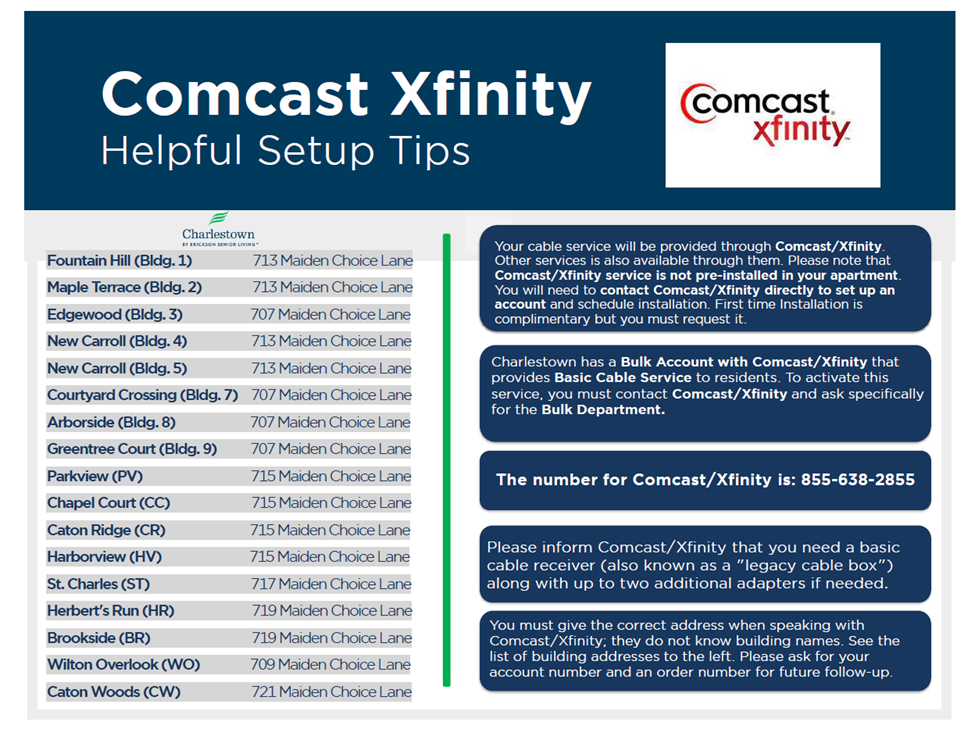
Your residence is equipped with basic HD cable. To install all services including premium
channels, DVR services or to get replacement equipment, please contact Comcast Bulk
Services directly at 1-855-638-2855. When you contact Comcast, you will not be taken to
Bulk Services automatically, you need ask for Bulk Services. We have a script on how to talk
to Bulk Services: https://ccicharlestown.org/2025/04/28/comcast-phone-script/
Upgrades to your cable service (premium channels) will incur additional charges which will
be your responsibility.
If you require assistance connecting your television for your initial set-up at move-in, please
contact the General Services Office at 443-29SERVE (443-297-3783). There is no charge to
connect television sets, program remote controls, battery replacements, and moving
furniture and/or entertainment centers to connect service.
Contact Erickson Resident Computer Services at 1-800-677-0211 for assistance with Cable
TV service issues in your Independent Living residence that your cable provider is unable to
resolve.
Contact Comcast:** Call 1-855-638-2855 (say you are a bulk contract customer).
Contact the the Erickson Resident Computer Services IT Desk for non-billing-related Comcast issues. Call 1-800-677-0211
Xfinity HD DVR’s Boxes and Instruction Manuals
HD stands for is High-Definition. DVR stands for Digital Video Recorder
What’s the Difference Between a TV Box and a TV Adapter? – Xfinity Support
These TV Adapters are normally used for additional HD TVs.
Self-Install TV Adapter YouTube guides:
Self-Install TV Adapter Note: Used for Standard and HD TVs
Xfinity X1 DVR’s Equipment Types
See Related Articles on left for additional functions, Remote pairing, etc.
Self-Install X1 DVR Box YouTube guides:
Self-Install X1 DVR Note: Charlestown uses our own Wifi MyConnect which uses Xfinity Wifi outbound.
4K TVs
4K UHD and 4K UHD/HDR viewing is currently available to Xfinity X1 and Xfinity Flex customers and requires a compatible Xfinity TV Box and compatible 4K TV.
Residents will need an X1 DVR Box (Xfinity X1 XG1v4 model numbers are AX014ANM or AX014ANC) and an X1 Non-DVR Box (Xfinity X1 Xi6 model numbers AX061AEI or TX061AEI) for each addition 4K TV. The current cost for these X1 Boxes is $10.00 per box per month which will show on your monthly Xfinity Bill.
Note, if you have a second TV that isn’t 4K you will need an X1 Non-DVR Box (Pace XG2 model PX022ANM or Samsung X2G model SX022ANC) these X1 Non-DVR allow for additional features.
Per Comcast Xfinity, the X1 4K TV Boxes (XG1v4 and Xi6) are not available to order online, and the Xi6 is not available in the Xfinity Stores.
The easiest way to receive an X1 4K TV Boxes is to contact Comcast Xfinity by Calling this dedicated number 1-855-638-2855 and asking for Bulk Call Center ordering a Getting Started kit. The only way to receive the Xi6 is to request a Getting Started kit.
FYI – Residents have said they have gotten these X1 Boxes from the local Xfinity Store.
See the PDF file which shows a Side-by-Side Xfinity X1 TV Box Comparison – DVR vs. Non-DVR
3-9-2023